How to Set Up Internet in Your New Apartment in France: Complete Guide
Setting up internet in France can be surprisingly confusing — even for French people. Between checking fibre eligibility, understanding technical terms, comparing providers, booking installation, and sometimes dealing with landlords or building managers, the process is not always straightforward.
For international renters moving into a new apartment, it can feel even more complicated, especially if you are trying to arrange everything in French or before you fully understand how the system works.
That is why we created this complete guide. Here, you will find everything you need to know to set up internet in your new apartment in France, including prices, timelines, useful websites, technical details, and what to do if fibre is not available.
1. First, Check What Internet Is Available at Your Address
Before choosing a provider, check your apartment’s internet eligibility, called éligibilité internet in French.
This means checking which type of internet your exact apartment can get. In most cities and many apartment buildings in France, the main option today is usually fibre optic internet, also called fibre or FTTH.
However, you should still check your exact apartment address, not only the street or neighbourhood. Internet availability in France can be very specific.
In many French cities, most apartment buildings already have fibre. However, the situation can still vary from one building to another. In some buildings, you may be eligible for Orange fibre but not Free, Bouygues, or SFR, or the opposite. This is why it is important to test your address on several provider websites before choosing an offer.
You can also use ARCEP’s official “Ma connexion internet” map to check fibre availability at your address. Zoom in or enter the exact address for the most useful result.
You should also check directly on provider websites, because your building may be eligible with Orange, for example, but not with Free, Bouygues, or SFR.
Websites to Check Eligibility
| Provider / Tool | What to Search Online |
|---|---|
| ARCEP official map | “ARCEP Ma connexion internet” or “carte fibre ARCEP” |
| Orange | Orange test éligibilité fibre |
| Free | Freebox test éligibilité |
| Bouygues Telecom | Bouygues test éligibilité fibre |
| SFR / RED | SFR test éligibilité fibre or RED box fibre |
| Sosh | Sosh fibre |
2. Look for the Fibre Socket Inside the Apartment
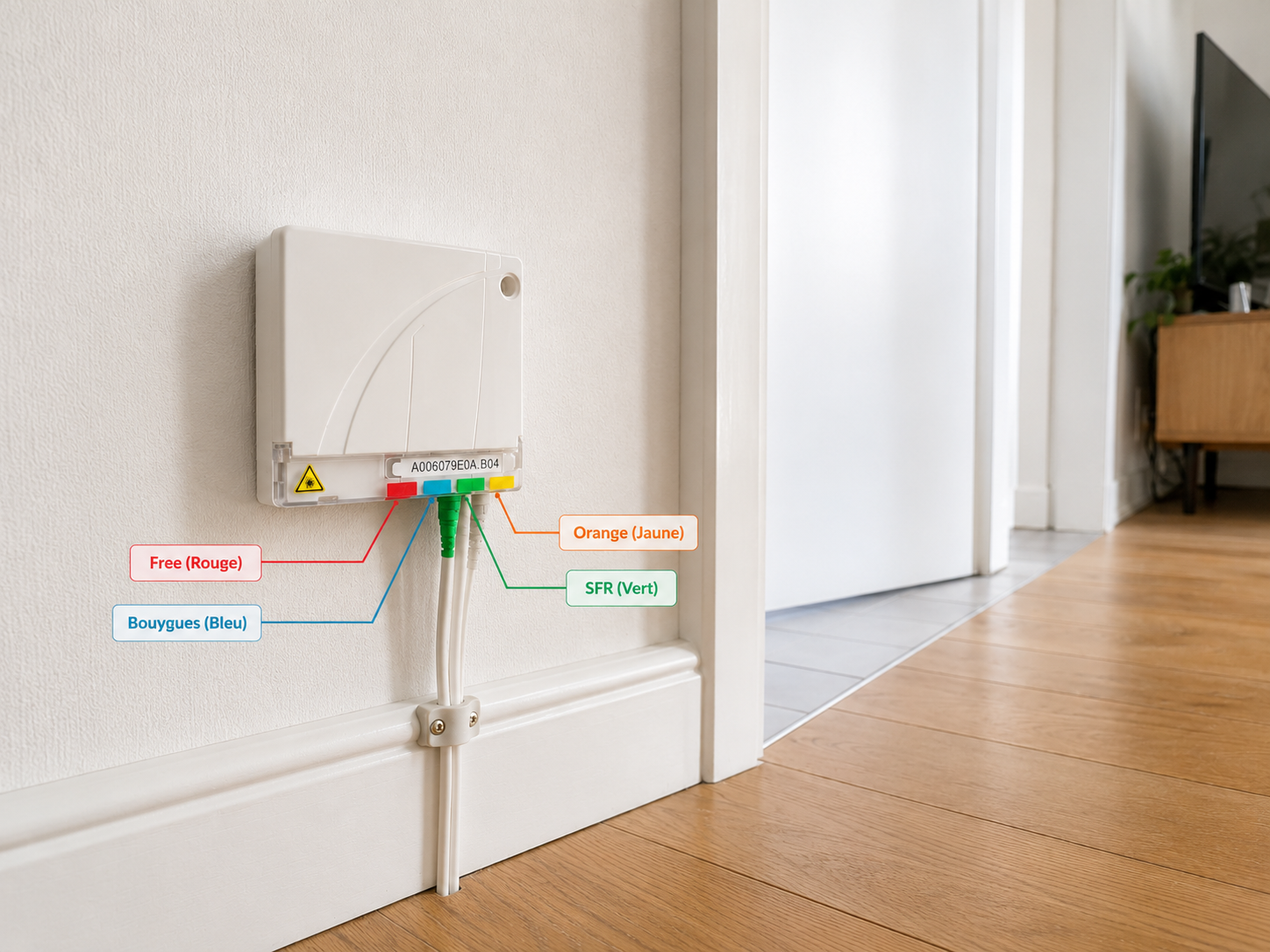
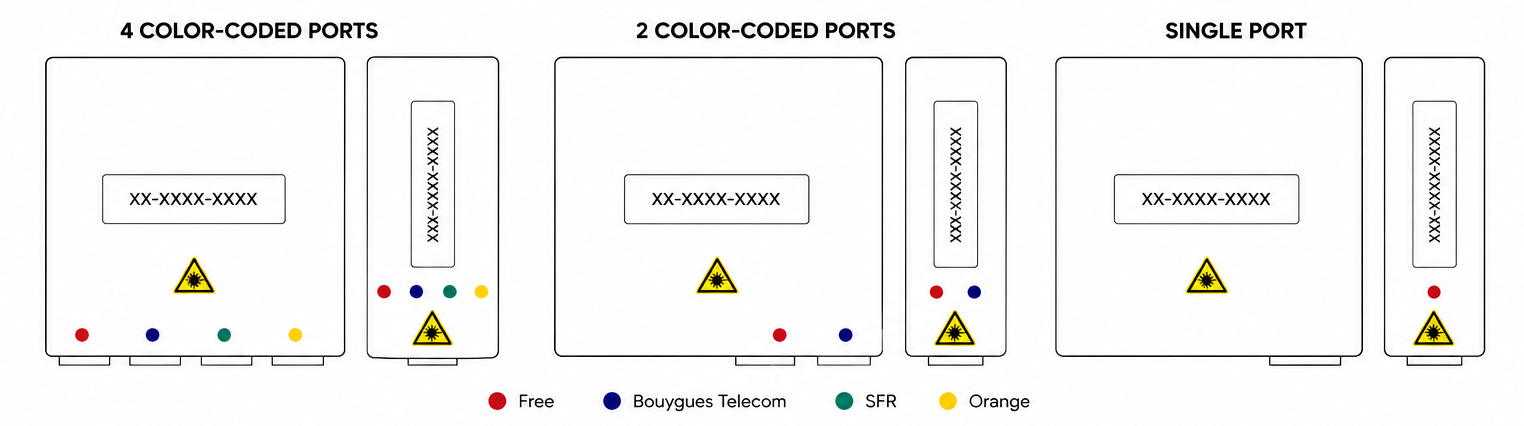
If fibre is available at your address, one of the first things to check is whether the apartment already has a fibre socket installed. This is usually a small white wall box located somewhere inside the apartment. In French, this box is called a PTO, which stands for Point de Terminaison Optique.
You may also see it referred to as:
- prise fibre
- boîtier fibre
- prise optique
The PTO is the connection point between your apartment and the fibre network serving the building. When your internet service is activated, the provider connects a fibre cable from the PTO to your internet box, allowing you to access the internet.
If the apartment already has a PTO, the installation process is often much faster and easier. In many cases, the provider only needs to activate the existing fibre line, rather than sending a technician to install a new connection inside the apartment.
Find the PTO Reference Number
Once you have located the PTO, the next step is to find its reference number. This number is very important because it helps the provider identify the exact fibre line connected to your apartment when you subscribe to an internet plan or book an installation.
The reference number is usually printed on a label attached to the PTO. It may be:
- visible on the front of the box
- hidden behind a small pull-out tab
- located inside the flap at the top of the socket
The PTO reference may look like one of these formats:
- FI-XXXX-XXXX
- UG-XXXXX-XXX or UG-XXXX-X
- CTP-XXXXXXX-X or CT-XXXXXX-X
- AXXXXXXXXX
- XXXXXXXX-XX-XX
If you cannot find the PTO or its reference number, or if you are not sure whether the apartment already has fibre, ask the owner, landlord, rental agency, or property manager. They may know whether fibre has already been installed, where the PTO is located, or which provider was used by the previous tenant.
3. Know Your Rights Before Installing Fibre
In France, tenants generally have the right to request fibre installation, and a landlord usually cannot refuse without a serious reason.
However, you should still inform the landlord, agency, or property manager before the installation, especially if the technician needs to drill, add a wall socket, pass cables, or access shared technical areas of the building.
4. Compare the Main Internet Providers in France
The main national providers are:
| Provider | Known For |
|---|---|
| Orange | Strong network, good reliability, often more expensive |
| Free | Competitive prices, high speeds, no-commitment offers |
| Bouygues Telecom | Good value, strong fibre offers |
| SFR | Cheap online plans through RED |
| Sosh | Orange network, online-only support |
| RED by SFR | Low-cost, no-commitment box plans |
Provider offers and market conditions can change, so always check the official provider websites before subscribing.
5. How Much Does Home Internet Cost in France?
Prices change often because French providers use promotions. At the time of writing, entry-level fibre offers start around €22.99 to €25.99/month, depending on provider, speed, and whether TV is included.
Typical Fibre Prices
| Provider / Offer Type | Approx. Monthly Price | Speed Range |
|---|---|---|
| RED Box Fibre | From about €22.99/month | Around 1 Gbit/s |
| Sosh Fibre | From about €24.99/month | Up to around 2 Gbit/s |
| Freebox Pop S | From about €24.99/month | Up to around 5 Gbit/s |
| Bouygues B&YOU / Pure Fibre | From about €25.99/month | Up to around 8 Gbit/s |
| SFR Starter Box | From about €27.99/month | Around 1 Gbit/s |
| Freebox Pop | Promo around €29.99/month, then higher | Up to around 5 Gbit/s |
These are approximate market prices, not guaranteed final prices. Always check the provider’s contract summary before subscribing.
Other Possible Costs
| Cost | French Term | Typical Amount |
|---|---|---|
| Activation fee | Frais de mise en service | Often €39–€49 |
| Cancellation fee | Frais de résiliation | Often around €49–€59 |
| Equipment non-return fee | Frais de non-restitution | Can cost around €70 to €180 or more |
| Technician visit | Intervention technicien | Often included for standard fibre, but special work may cost extra |
| Shipping fee | Frais d’envoi / livraison | Sometimes included, sometimes extra |
| Wi-Fi repeater | Répéteur Wi-Fi | Included in some premium plans, paid in others |
6. How to Subscribe to an Internet Plan in France
Once you choose a provider, you can usually subscribe online. You may need:
- Your full address
- Apartment number, floor, building, staircase
- Your name
- Your phone number
- Email address
- French or SEPA IBAN
- Previous tenant’s name, if known
- Old landline number, if known
- PTO number, if fibre socket exists
- Date you want installation
- Proof of identity in some cases
Some providers accept non-French IBANs from the SEPA zone, but online forms can sometimes reject them. If that happens, call customer support or go to a shop.
7. How Long Does It Take to Get the Internet Installed in France?
The timeline depends mainly on one thing: whether the apartment already has a fibre socket.
Scenario A: The Apartment Already Has a Fibre Socket
This is usually the easiest and fastest case.
In many situations, the internet can be ready in 2 to 10 days, sometimes even faster.
You usually need to:
- Subscribe online or by phone.
- Give the PTO number if the provider asks for it.
- Receive the internet box by post or collect it from a pickup point.
- Plug the box into the fibre socket.
- Wait for the line to be activated.
Sometimes, no technician visit is needed because the provider can activate the line remotely.
Scenario B: The Building Has Fibre, but the Apartment Has No PTO
In this case, the building is connected to fibre, but your apartment still needs its own fibre socket.
A technician must come to the apartment to install the PTO. This usually takes around 1 to 3 weeks, depending on appointment availability and access to the building’s technical areas.
The usual steps are:
- Subscribe to a fibre offer.
- Book a technician appointment.
- The technician connects your apartment to the building’s fibre network.
- The technician installs the PTO inside the apartment.
- The technician connects and tests the line if possible.
Scenario C: Fibre Is Not Available in the Building
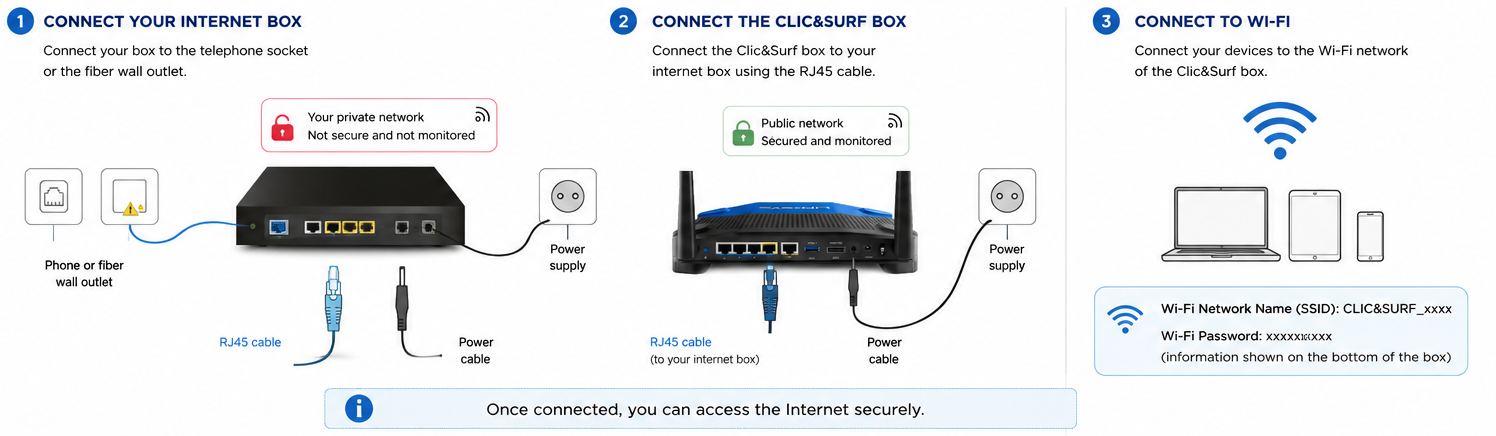
If fibre internet is not yet available in your building, or if your fibre installation appointment is scheduled several weeks from now, don’t worry. A 4G or 5G home internet box can be a simple and fast solution, especially if you are staying in the property for a short period or need internet access while waiting for fibre to be installed.
Unlike a fibre connection, this type of internet box uses the mobile network, just like a smartphone. Setup is usually very simple: just plug the box into a power outlet and connect to the Wi-Fi network.
This is often a good option for people who have just moved in, are only staying in the property for a few months, or want to avoid a more complicated installation process.
Keep in mind, however, that connection quality depends on mobile network coverage at your address. Before signing up, check the provider’s 4G or 5G coverage map and, if possible, test the signal inside the property using your phone.
8. Before Installation Day: Prepare Access, Permissions, and Box Location
After subscribing to your fibre offer, the provider may send you an email with a link to complete a form.
It is important to complete all the steps in this form. The provider uses this information to check whether a technician appointment is needed, whether you need to be at home during the visit, and what type of installation is required.
If fibre installation is required, a technician will come to the apartment. Before the appointment, make sure:
- you are home during the appointment window
- you know how to access the building’s telecom room, basement, or shared technical cabinet
- you have the building access code, keys, badge, or contact person if needed
- you have permission from the landlord or agency if drilling, cable routing, or a new wall socket may be needed
- you can show the technician where you want the internet box installed
- you know where the existing fibre socket is, if there is one
If the technician cannot access the building’s technical area, the appointment may fail and need to be rescheduled. This can delay your internet installation by several days or even weeks.
To avoid problems, contact your landlord, agency, property manager, or syndic before the appointment and ask how the technician can access the technical areas of the building.
9. How to Plug in Your Internet Box and Connect to Wi-Fi
After installation, the provider will give or send you an internet box, called a box internet or simply box in French.
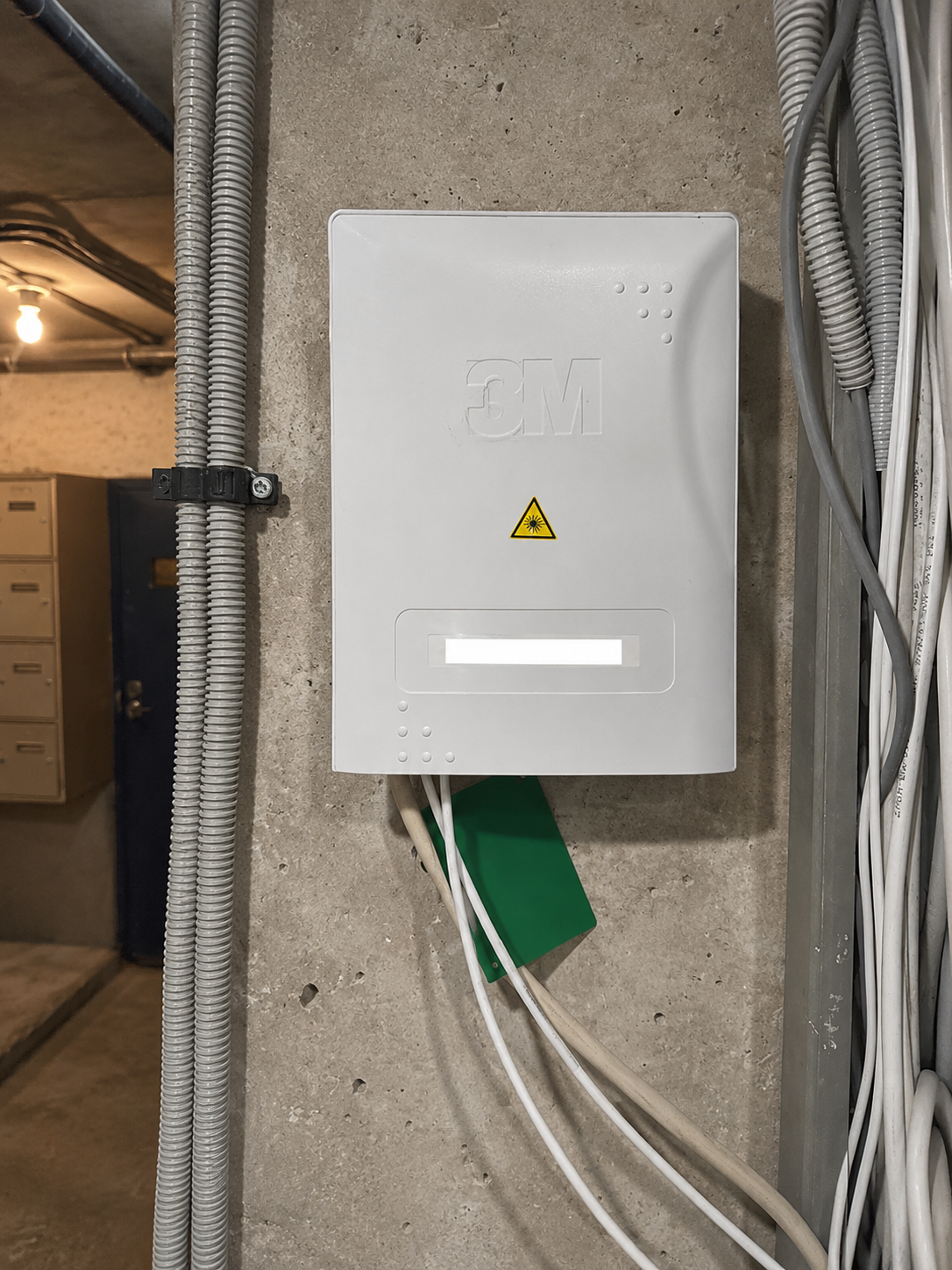
To connect it, follow the instructions from your provider, but the basic steps are usually:
- Plug the fibre cable into the fibre socket, called the PTO.
- Connect the other end of the fibre cable to the internet box, usually in the fibre or optical port.
- Plug the box into a power socket.
- Turn on the box and wait for the lights to become stable.
- Connect your phone or computer to the Wi-Fi network shown on the label of the box.
- Enter the Wi-Fi password, usually called clé Wi-Fi or mot de passe Wi-Fi.
You can usually find it on a label under or behind the internet box.
Older Parisian apartments often have thick walls, so the Wi-Fi signal may not reach every room properly. If the connection is weak, you may need a Wi-Fi repeater, a mesh Wi-Fi system, or an Ethernet cable for a more stable connection.
10. Before Moving Out: Cancel or Transfer Your Internet Contract
When you leave the apartment, remember to cancel or transfer your internet contract.
Before moving out, check:
- the cancellation process and effective cancellation date
- the cancellation fees, called frais de résiliation
- whether your new address is eligible for the same provider
- how to return the internet box and accessories
- whether you need to print a return shipping label, called étiquette de retour
- the deadline to return the equipment
You usually need to return:
- the internet box or modem
- the TV decoder, if you have one
- the remote control
- power cables
- fibre cable
- Ethernet cable
- any Wi-Fi repeater provided by the operator
For example, if you cancel your contract but forget to return the TV decoder or power cable, the provider may charge frais de non-restitution, meaning equipment non-return fees. These can become expensive if several items are missing.
After sending the equipment back, always keep the tracking number, receipt, or proof of return. This can protect you if the provider later says they did not receive the box.
Useful French Words to Know
- Fibre — Fiber internet
- Box internet — Internet modem/router package
- Prise fibre / PTO — Fiber wall socket
- Raccordement — Connection or installation
- Technicien — Technician
- Éligibilité — Eligibility
- Sans engagement — No long-term commitment
- Frais de mise en service — Activation fee
- Résiliation — Cancellation
- Débit — Internet speed
Final Tip
If you are renting through a local agency or property manager, ask them if they can help with the internet setup. Some agencies work with local partners or technicians who can help you choose a provider, book the appointment, install fibre if needed, and connect the internet box.
This service may cost extra, but it can save you a lot of time and stress, especially if you do not speak French or are not familiar with the process in France.
Photo by Domenico Loia on Unsplash.